
In a large-scale environment, software deployment automation provides efficiency for employees and the IT departments. Moreover, It solves existing challenges but brings new ones. These challenges require adaptation from the IT department and the software vendors.
The purpose of this memo is to demonstrate that allowing a low-privilege user to install software should be carefully planned/tested. Because most software installers aren’t aware of the new deployment conditions, these new conditions introduce a new boundary that is possible to exploit in most installers.
Existence Challenges for Software Deployment
- the amount of 3rd party software and its updates
- Installations often have to be run with Administrator account privileges
- Allowing admins to share devices with employees raises privacy concerns
Large-scale environment and Microsoft Endpoint Manager (MEM)
- A secure and scalable way for application deployment
- Low privilege users can request application deployment
- AppEnforce and deployment properties for MSIServer.exe
Software packaging challenges
- Running in a different context
- Dynamic Mapping for Application Data Folder
- Security Controls during runtime
Intended install/uninstall process
Installations often have to be run with Administrator privileges because they update or modify parts of the system.
Therefore, an Administrator is trusting an installer and its actions. Also, as we have administrative privilege, we are running in the same trust boundary as the system. We can go ahead and execute any actions to provision the device
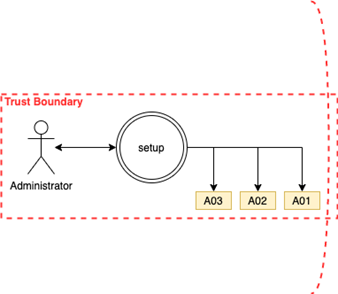
Regular home user starting installer with an Administrator account
Introduction to ConfigMgr (Server)
An organization with 10k+ endpoints and users demands third-party software for daily tasks. And authorizing administration privileges to employees is against corporate policy, Plus, manually handling every installation/uninstallation/update. Moreover, managing licensing and usage approval will not be a feasible job for a large-scale.
The Microsoft Endpoint Manager comes to solve these corporate issues by
- Create a Deployment (package or application)
- Security Configuration AppEnforce
Which results of software as service to employees and it is called Software Center under Microsoft Endpoint Manager.
In other words, “a non-admin user will be able to install, uninstall, upgrade software in his/her workstation.”
Create a Deployment (package or application)
ConfigMgr Admins can define the metadata about the application, The metadata describes how each software will get provisioned inside the Endpoints, these software can be msi packages or exe, PowerShell script also you can mix and match.
● Installation file content location
● Install/Uninstall commands.
● Installation behavior and User Experience
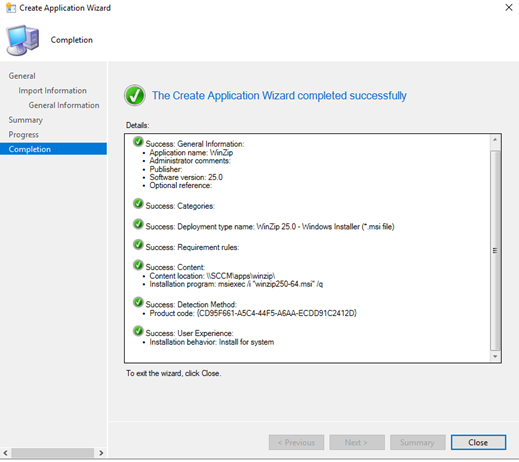
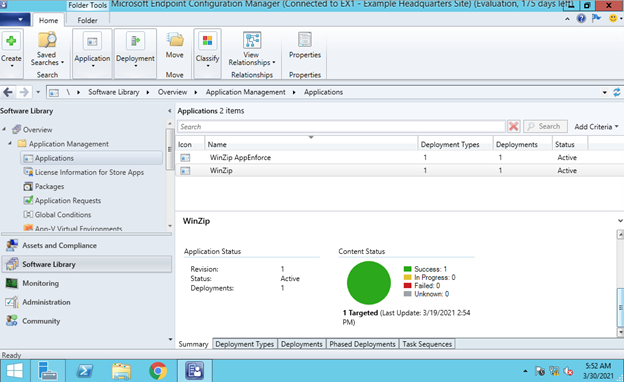
App enforcement environment
AppEnforce “Installation Behavior” is a part of the deployment metadata properties that instructs the EndPoint to communicate the deployment properties to the windows installer service to do the following actions.
.
1) Prevent users from interacting with the UI during the installation runtime
2) Enforce the installer to run in a controlled context
2.a) User Context enforces the installer to run as the requester (employee)
2.b) Machine Context the installer will run as SYSTEM
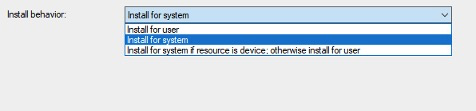
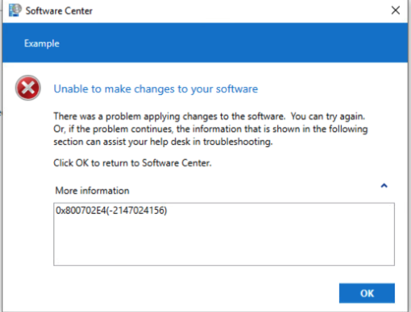
The default option is to run as SYSTEM, Because of the Integrity level that is required by the installers, Most of the application if you enforced it to install for user will raise an error 0x800702E4 (elevated privilege is needed), and forces the admins to install for SYSTEM
Endpoint Manager (Client)
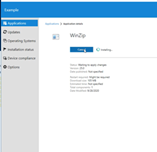
The client uses SOAP UI to communicate with the ConfigMgr Server to download the application list with its latest metadata. then it will populate the Software Center. Finally, the employees can choose which software they need from a software center and get it provisioned automatically.
What just happened?
An employee with absolutely no privilege requested an application from the Software Center.
This application got copied to his/her device inside c:\windows\ccm\ccmcahe\. A process named CCMExec communicates the setup properties to the Windows Installer Service (msiserver.exe), executes the installation command with the appropriate AppEnforce, and provision the device while he/she is enjoying (Administrator Free) coffee.
The exposed boundary
This issue resides that most software packages assume it will run with the administrator profile and instruct the installer to uses Application Data Folder by mapping CommonAppDataFolder Property as a protected area to read/write/execute from.
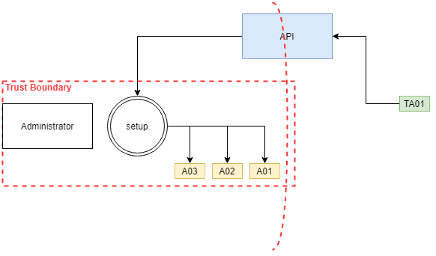
But during a deployment, we are running NT AUTHORITY\SYSTEM, a built-in Windows Account, account that you can’t look up its name and go ahead and use its AppData folder, therefore the installers are forced to use c:\windows\temp instead of c:\user\SYSTEM\AppData.
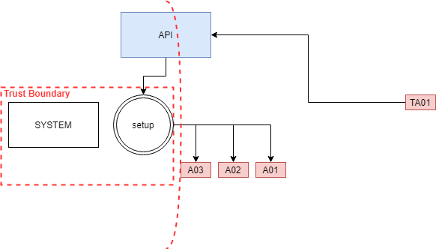
Elevation of Privilege Samples
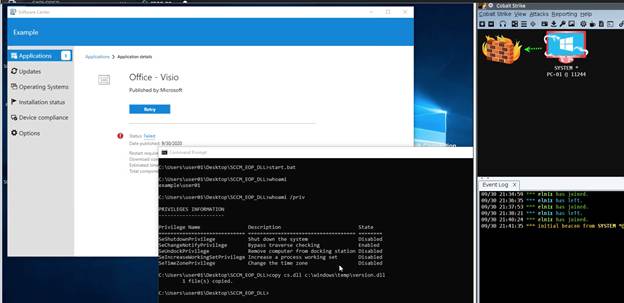
Microsoft Office Installer: DLL Hijacking EoP
Microsoft Office installer setup.exe Must run with Machine Context because it requires Administrator Privilege. Once CCMExec initiates setup.exe as SYSTEM, it writes and executes ose00000.exe from c:\windows\temp. While it uses Dynamic Link Library, it falls into DLL Order hijacking attack and tries to resolve the DLLs from windows temp.
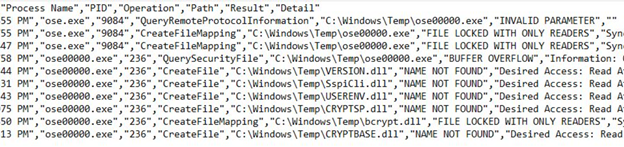
By planting a malicious DLLs in the temp, of course none privileged users can write to the temp. we can get our code executed in the SYSTEM context.
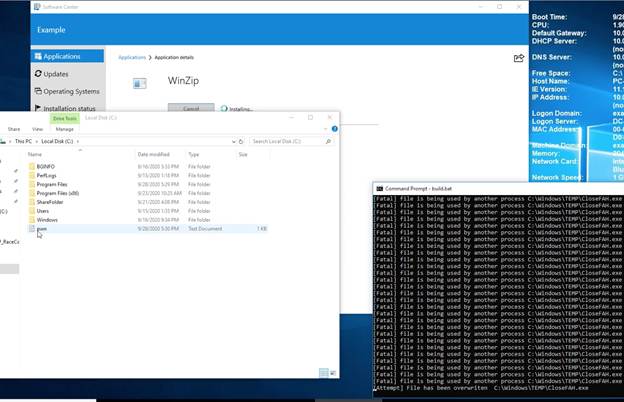
WinZip Race Condition EoP
During the setup of WinZip, I found that the MsiExec.exe while it runs under the SYSTEM account, it tries to write and execute CloseFAH.exe file inside windows temp. The time average between closing the write operation and running the file is ~200 milliseconds. It is sufficient to implement a race condition attack, overwrite the CloseFAH.exe with our malicious code and get it executed under SYSTEM account permissions.

Red Team Operational Procedures
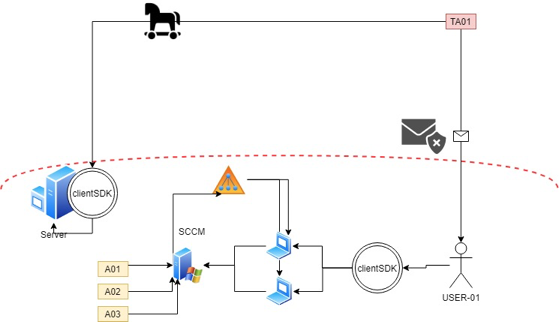
the purpose of this procedure to demonstrate how we can exploit these vulnerabilities through a command-and-control session
During engagement, when you encounter a foothold in a compromised machine, you can verify if the Software Center is installer by looking into the process list and Identify the client CCMExec.exe
If the device is provisioned with CCM, we can locate the installation and behavior enforcement log file inside c:\windows\CCM\logs\AppEnforce.log, AppEnforce log file can give us a decent amount of information that will allow us to deploy an attack against the compromised device.
● Unique Identifier for installation & uninstallation
● Execution Context
● command line to execute the install and the uninstall
● Cache folder, which includes the setup files
If the system admins like to use PowerShell to initiate the setup instead of direct MsiExec.exe command. This will position PowerShell before MsiExec.exe and introduce more DLL Hijacking opportunities.
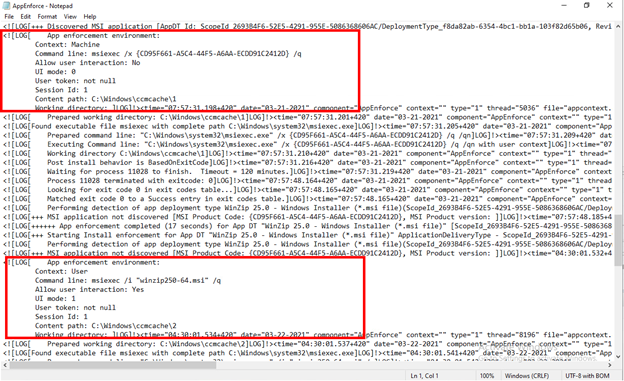
After we map applications to cache folders, we can go ahead and exfiltrate the installer files from the compromised device.
Then in the attacker device run psexec -i -s cmd.exe to simulating SYSTEM permission and initiates the setup command from the newly opened window and uses procmon.exe to identify vulnerable operations like
Operation is CreateFile Operation is LoadImage Path contains .cpl Path contains .dll Path contains .drv Path contains .exe Path contains .ocx Path contains .scr Path contains .sys
Once we have planted our malicious inside the victim device, we can utilize the WMI namespace \root\ccm\clientSDK. to initiate the installation or uninstallation to trigger the vulnerable action.


Protect and Detect
● AppEnforce user context if possible.
● Consider absolute paths.
● Ensure post-install, post-uninstall scripts/apps is protected
Leave a Comment